
Nectir AI Now Auto-Syncs Directly with Your Canvas Courses

If your institution uses Canvas, there's a good chance you're already running Nectir AI's LTI integration. That integration solved a critical problem: it embedded Nectir AI directly in Canvas, allowing students to access their AI Assistants without leaving the LMS. No separate logins. No context-switching. It made the student experience seamless.
But there was still a gap. LTI handled access. It didn't handle knowledge.
Even with LTI in place, when an instructor wanted their AI Assistant to actually reference their course materials, they had to upload those files manually. Download the syllabus from Canvas, open Nectir AI, and upload it. Do the same for the rubric, the assignments, the lecture slides. Then do it again if and when the materials change mid-semester.
Starting this week, that gap is closed.
Nectir AI now connects directly to Canvas through a new API integration that lets instructors browse their courses, select the materials they want, and import them into their AI Assistant's knowledge base in a few clicks. Pages, assignments, files, discussion topics, quizzes. All of it, pulled straight from Canvas without ever leaving Nectir AI.
If LTI was the front door for students, the API integration is the supply line for course content. Together, they make Nectir AI a fully connected layer of your Canvas environment.
How the Canvas API Integration Works
The setup happens at the institutional level. A Canvas administrator creates a developer key (a read-only API credential) and connects it to the Nectir AI Workspace. Once that's done, every instructor in the Workspace can pull Canvas content into their AI Assistants directly.
Here's the step-by-step from an instructor's perspective:
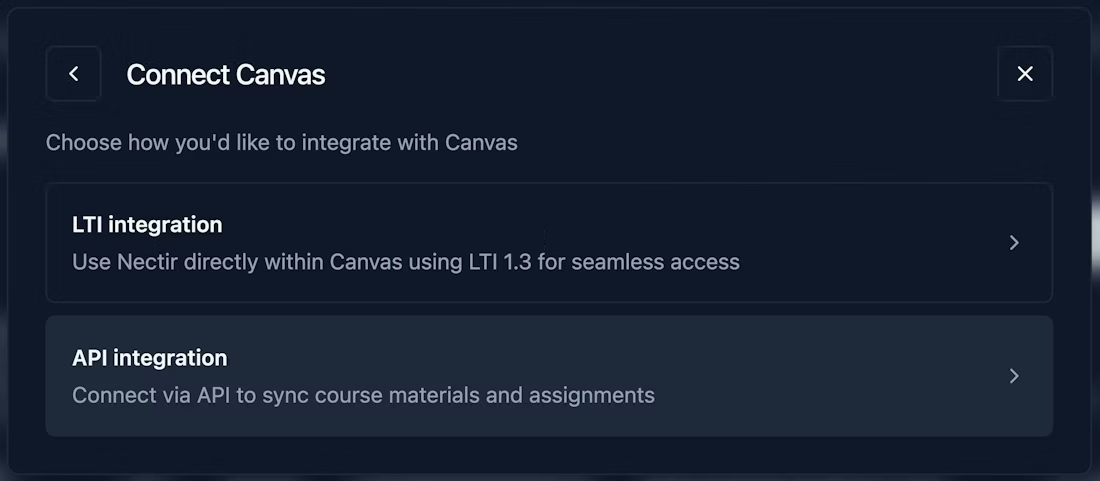
- Open your AI Assistant's knowledge base settings in Nectir AI.
- Select "Add from Canvas."
- Browse your enrolled courses and select the content you want to import: pages, assignments, files, discussion topics, or quizzes.
- Click import. The materials are now part of your Assistant's knowledge base.
That's it. Your AI Assistant is now grounded in your actual course content, and you didn't have to leave the platform to make it happen.
For a full technical walkthrough of how administrators connect the API, visit our Canvas API Setup guide.
What Content Can You Import from Canvas?
The integration supports six content types that cover the core of what most instructors build their courses around:
- Pages: Lecture notes, study guides, course policies, and any content you've published as a Canvas page.
- Assignments: Assignment descriptions, instructions, rubrics, and due date context.
- Files: PDFs, slide decks, documents, and other files stored in your Canvas course.
- Discussion Topics: Prompts and descriptions from your Canvas discussions.
- Quizzes: Quiz structures, questions, and answer options.
- Modules: Full module structures, so you can import organized groups of content at once.
If it lives in your Canvas course and you want your AI Assistant to reference it, you can bring it in.
Why This Matters: From Access to Intelligence
The LTI integration was a significant step forward. It meant students could reach Nectir AI from within Canvas, and institutions could manage access through their existing LMS infrastructure. That alone drove adoption across campuses.
But access and intelligence are two different things. An AI Assistant that students can easily reach is only as useful as the knowledge it has to draw from. And until now, that knowledge had to be assembled by hand.
The practical result was that most instructors uploaded a handful of their most important documents and stopped there. Not because they didn't want a more comprehensive knowledge base, but because the time cost of downloading, organizing, and re-uploading every piece of course content was hard to justify, especially when teaching three or four sections.
The API integration changes that calculus entirely.
- It makes AI Assistants more comprehensive. When importing course content takes a few clicks instead of an hour of file management, instructors actually import everything. More coverage in the knowledge base means the Assistant gives more relevant, more accurate answers. Students get support that reflects the full scope of the course, not just the three documents the instructor had time to upload.
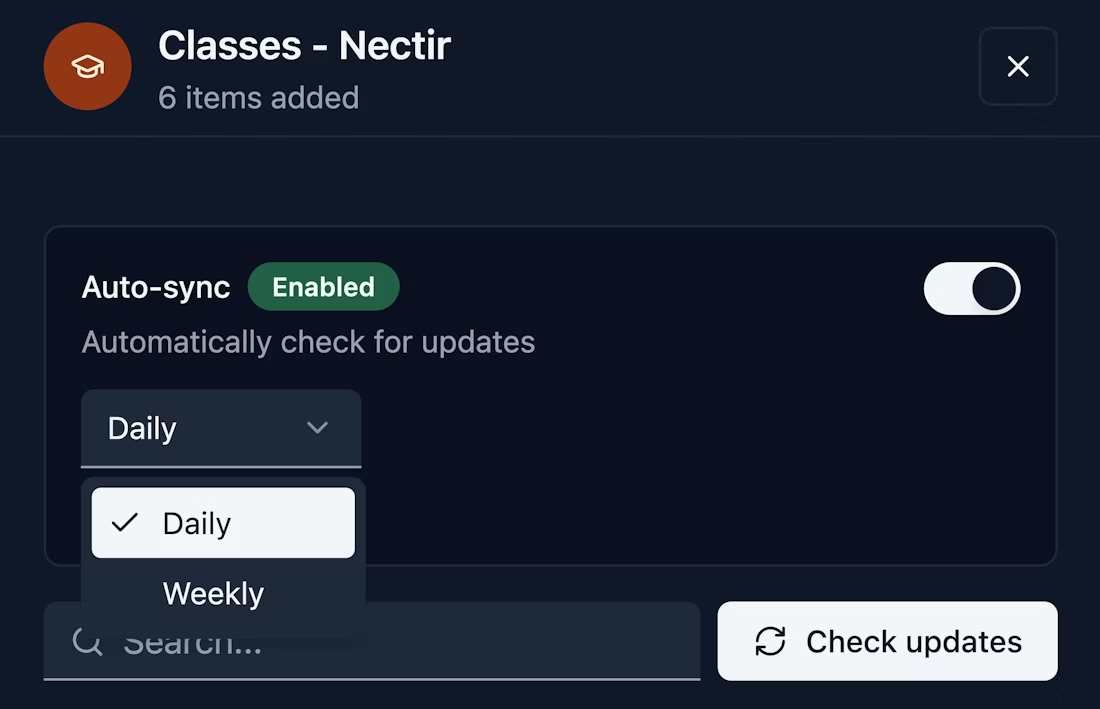
- It keeps the knowledge base current. Course content evolves. Syllabi get revised, assignment instructions get clarified, new readings get added. With the API integration, instructors can re-import updated content from Canvas at any point in the semester. The AI Assistant stays in sync with the course as it's actually being taught.
- It makes onboarding realistic at scale. When a campus is rolling out Nectir AI across 50 or 100 courses, asking every instructor to manually build a knowledge base is a meaningful barrier. The API integration turns setup into a five-minute task. That's the difference between a pilot that works for early adopters and a deployment that works institution-wide.
How Is This Different from Nectir's LTI Integration?
This is worth explaining clearly, because both integrations involve Canvas and Nectir AI, but they operate at completely different layers of the stack.
The Technical View
LTI 1.3 (Learning Tools Interoperability) is an IMS Global standard that handles authentication, deep linking, and iframe embedding. When your institution sets up Nectir's LTI integration, it creates a trust relationship between Canvas and Nectir AI at the platform level. Students launch Nectir AI from within Canvas, and the LTI handshake passes identity and course context so they land in the right place without creating a separate account. LTI operates at the presentation and access layer. It knows who the student is and what course they're in, but it doesn't interact with course content.
The Canvas API integration operates at the data layer. It uses Canvas's REST API with OAuth 2.0 authentication and scoped read-only permissions to retrieve structured course content, including pages, assignments, files, discussions, quizzes, and module hierarchies. That content is ingested into the AI Assistant's knowledge base, chunked, embedded as vectors, and stored in Nectir's encrypted infrastructure. The API never writes back to Canvas. It's a one-way content pipeline.
Together, they form a full-stack integration. LTI handles the session, and the API handles the knowledge.
What This Means for Teaching and Learning
For faculty and academic leadership, the distinction matters because it directly affects the quality of AI support students receive.
With LTI alone, students had a convenient way to access their AI Assistant directly through Canvas. That's valuable, but the Assistant's knowledge base still depended on whatever the instructor had time to manually upload.
With the API integration layered on top, the AI Assistant now has direct access to the course itself. An instructor can import their entire course library in minutes: every page, every assignment description, every discussion prompt. The result is an AI that not only lives inside Canvas but also understands the course.
You can think of it this way: LTI is the front-of-house of a restaurant, ensuring customers who walk in can quickly and easily be seated and order. The API is the supply truck that delivers ingredients to the kitchen every morning. Without the truck, the chef can cook, but only with whatever someone carried in by hand. With it, the kitchen is fully stocked, and the menu actually works.
You can learn more about the LTI setup options in our Canvas LTI Guided Setup guide.
What About Data Security?
This was a non-negotiable for us. The Canvas API integration is read-only. Nectir AI can view and retrieve course content from Canvas, but it cannot create, modify, or delete anything. Your Canvas courses stay exactly as they are.
All data synced through the integration is stored within Nectir's encrypted infrastructure and is governed by the same FERPA and SOC 2 compliance standards that apply to everything on the platform. Imported content is never used to train AI models and never leaves Nectir's secure environment. For a detailed breakdown of how Nectir AI handles your data, read our post on how Nectir AI Course Assistants actually work and why your data stays yours.
Canvas administrators also have granular control over which API scopes are enabled, meaning your IT team can limit the integration to the exact permissions your institution is comfortable with.
Getting Started
If your institution already uses Nectir AI with Canvas, your Workspace Owner or IT administrator can set up the API integration today. The process takes about 15 minutes and requires Canvas admin access to create a developer key. Our step-by-step setup guide walks through every screen.
If you're not using Nectir AI yet and want to see how the Canvas integration works alongside the rest of the platform, schedule a demo, and our team will walk you through it.
Frequently Asked Questions About the Canvas API Integration
What is Nectir AI's Canvas API integration? Nectir AI's Canvas API integration is a direct connection between your institution's Canvas LMS and your Nectir AI Workspace. It allows instructors to browse their Canvas courses from within Nectir AI and import course content (pages, assignments, files, discussions, quizzes, and modules) directly into their AI Assistant's knowledge base. This eliminates the need to manually download and re-upload materials.
What Canvas content can I import into Nectir AI? You can import pages, assignments, files, discussion topics, quizzes, and full module structures. If the content is published in your Canvas course, it's available for import.
Does Nectir modify or delete anything in my Canvas courses? No. The integration is strictly read-only. Nectir AI retrieves content from Canvas but cannot create, edit, or delete anything in your LMS. Your Canvas courses remain completely untouched.
Is my course data secure when using the API integration? Yes. All imported content is stored within Nectir's encrypted infrastructure and governed by the same FERPA and SOC 2 compliance standards that apply across the platform. Your course materials are never used to train AI models. For more details, visit our Trust Center.
How is the API integration different from the LTI integration? The LTI integration embeds Nectir AI within Canvas, allowing students to access their AI Assistants directly from the LMS. The API integration syncs your Canvas course content into the AI Assistant's knowledge base. LTI handles access; the API handles knowledge. Most institutions use both together for the best experience.
How do I get started? If your institution already uses Nectir AI, your Workspace Owner or Canvas admin can follow our setup guide to connect the API in about 15 minutes. If you're new to Nectir AI, schedule a demo to see the full platform in action.